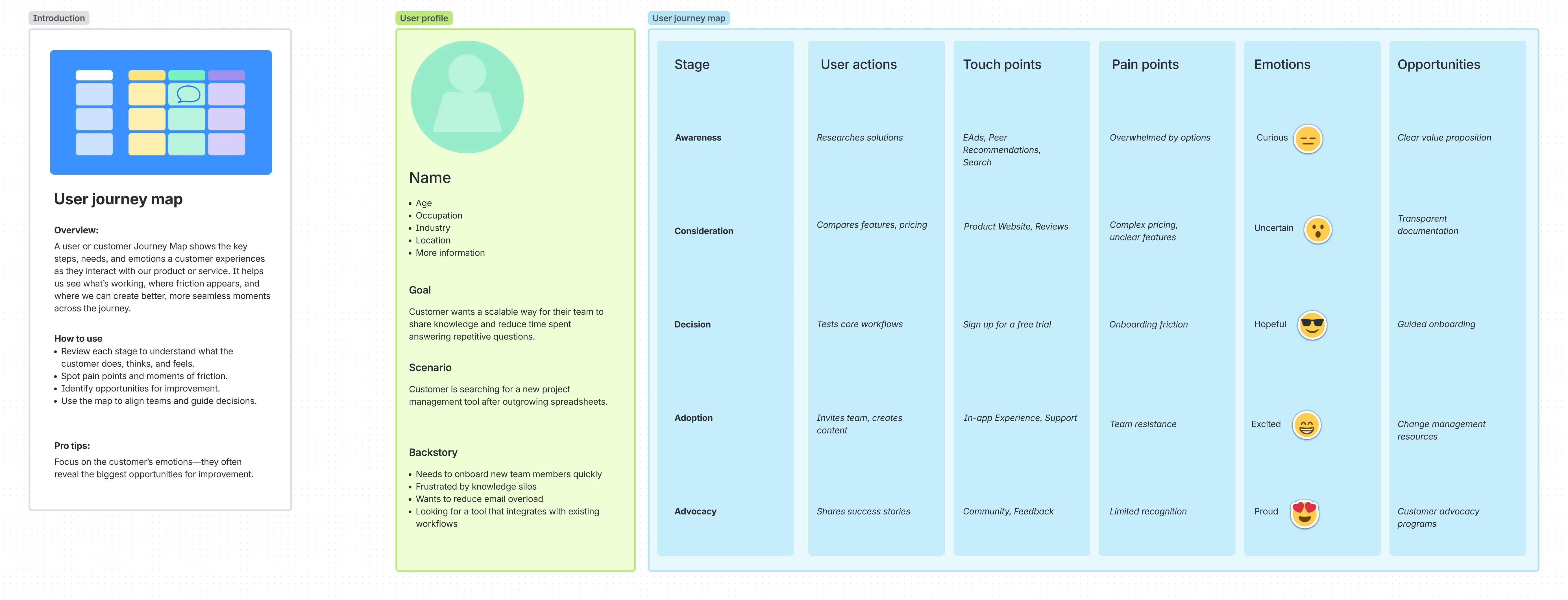
Journey map template
Created by:

Visualize every customer journey to enhance the overall customer experience and create a better product
Categories
- Product Management
- Marketing & Sales
- Design
- UX Research
- Whiteboard Template
KEY FEATURES
Ideation
Stakeholder Alignment
Communication
When multiple teams need to assess customer motivations and behavior correctly, you need a way to get everyone on the same page.
A customer journey map is the go-to visual tool for achieving this, especially in a collaborative environment.
A customer journey mapping template is a quick way to build such a map, documenting customer actions, thoughts, and feelings. The end goal is an interface that guides your entire organization toward a seamless user experience. Learn more about journey maps, what they should include, and best practices for creating one.
What is a journey map?
A customer journey map is a visual representation that illustrates a customer's experience with a product, service, or brand from start to finish. It accounts for all interactions and touchpoints, from initial awareness to post-purchase support and even advocacy.
At each of those touchpoints, it details the customer’s associated actions, thoughts, and emotions. By following this map, sales and management teams can gain a deep, empathetic understanding of the brand’s buyers and users. It also helps identify friction points, pain points, and opportunities for improvement.
Customer journey mapping breaks down departmental silos by providing a customer-centric view that aligns teams across the organization. Done as part of a whiteboarding strategy, it helps marketing, sales, support, and product development teams align around a common objective: enhancing the user experience.
What is a journey map template?
A user journey map template is a pre-designed framework that provides a structured, consistent starting point for creating a customer journey map. It usually comes with pre-structured sections that cover essential elements, such as user personas and journey stages (e.g., awareness, consideration, decision). Each section has rows for documenting the customer’s actions, emotions, and pain points.
Using a template simplifies the process, making it easier for any team member to create a detailed map. It ensures that critical elements aren't overlooked and helps teams maintain consistency across different maps or reports.
Instead of building a new structure from scratch, teams can focus their energy on filling in the substance, based on user research and insights. This accelerates the overall path from ideation to action. The resulting agility enables staff to quickly visualize and address user needs, informing strategic decision-making and product development.
Why use a journey map template?
Using a journey map template is a strategic choice that brings speed and structure to the customer tracking process. For teams new to this practice, a template acts as a guide, providing a clear, step-by-step framework that ensures all essential elements of the customer's experience are considered.
This is particularly valuable for groups working under tight deadlines. Since the template eliminates time spent on design and formatting, teams can focus directly on gathering insights and articulating the customer story.
Templates also foster project collaboration by providing a shared, consistent model that multiple teams can refer to.
What should be included in a journey map template?
To create a comprehensive and useful journey map, a template should be structured to capture the full spectrum of the customer's experience. Key components typically include:
User persona: A detailed, idealized representation of the target customer, including their goals, behaviors, and motivations.
Touchpoints: Every point of interaction between the customer and the business, whether it's through a social media ad, email, website, or conversation with a staff member or agent.
Journey stages: A chronological breakdown of the customer's journey, such as "Discovery/Awareness," "Consideration/Research," "Decision/Transaction," and "Loyalty/Retention."
User actions: The specific behaviors the customer performs at each stage (e.g., searching for a product, reading a blog post, requesting a demo).
Emotions: The feelings the customer reports throughout the journey, which can be visualized with an emotional graph to show highs and lows.
Pain points: Specific challenges, frustrations, or roadblocks the customer encounters, such as a confusing checkout process or a lack of clear documentation.
Opportunities: Ideas for improvement or innovation that are identified by analyzing the pain points and emotional highs and lows.
Benefits of using a journey map template
Saves time
Since there’s no need to build a map from scratch every time, teams can jump straight into the research and analysis, immediately uncovering insights from real data rather than getting bogged down in formatting and design. The time saved can be redirected toward developing and implementing solutions that directly address customer needs.
Aligns teams
As a shared source of truth for cross-functional teams, the centralized framework gives departments like product, marketing, and customer support a unified perspective on the customer journey. This shared understanding improves communication and facilitates more effective team meetings. In the end, everyone is working toward the same customer-centric goals.
Uncovers pain points
Teams can quickly see where users are feeling frustrated, confused, or stuck. This clear visibility helps in identifying and prioritizing the most critical issues to fix, leading to a smoother and more satisfying customer experience.
Identifies opportunities
A comprehensive view highlights areas that can be improved. The insights on pain points reveal unmet needs, inefficient processes, or missing touchpoints. These can be prioritized for optimization, leading to new features, better content, or more effective support strategies. Again, this enhances the customer's overall experience, driving business growth.
For a deeper look into your strengths, opportunities, weaknesses, and threats, use the SWOT analysis template.
Improves decision-making
Since a journey map template streamlines the process of research and analysis, it enables teams and leaders to make data-driven decisions based on real customer behavior. This affects all areas, such as where to allocate resources, what features to prioritize, and how to refine strategic planning.
How to use the journey map template
- 1
Define your goal
Before you begin, establish a clear objective for your journey map. What question are you trying to answer with this exercise, or what problem are you trying to solve?
For example, are you trying to understand why customers are struggling with a specific feature, or are you exploring a new user onboarding flow? Setting a solid goal ensures your team stays focused and that the final map provides meaningful insights.
- 2
Gather customer data
An effective journey map is based on real customer experiences rather than assumptions. Use both qualitative and quantitative data to guide your mapping. This can include insights from user interviews, surveys, customer feedback, and behavioral analytics. Collect information on what your users are thinking, feeling, and doing at each stage of their journey.
- 3
Choose a customer persona
Multiple buyers of the same product rarely have a similar journey. For example, a software engineer and a project manager might both use the same project management tool, but their needs, goals, and daily workflows are vastly different. Each customer journey map should be tailored to a specific customer persona.
Identifying a target customer helps you maintain a focused narrative and tell a consistent story about that persona's experience. The data collection and research in step 2 ensure that the persona accurately reflects a real customer segment.
You can also use a user persona template to streamline this process.
- 4
Fill in the stages
Just as a single product appeals to different personas, those personas can also be distinguished based on the various stages of the customer journey. Their needs will vary at each stage.
Standard stages such as Awareness, Consideration, Purchase, and Post-Purchase provide a chronological structure for your map. This allows you to tell a story about a user's progress toward their goals. Be sure to keep the stages consistent across different customer journeys or projects to enable easier comparison and analysis.
- 5
Add touchpoints and emotions
Within each stage, document the specific touchpoints where the customer interacts with your brand (e.g., social media ads, product pages, support articles). For each touchpoint, describe the user's actions and evaluate whether they displayed notable emotions. This is where you’ll map the high and low points of the experience, highlighting both positive moments and points of frustration.
- 6
Analyze and act
With the map completed, your team can begin to analyze it. Look for patterns and groupings. These could identify major pain points and opportunities to improve the experience. Use these findings to brainstorm solutions and prioritize a backlog of improvements.
Create a journey map with Confluence whiteboards
Confluence online whiteboards provide a dynamic, collaborative space for creating customer journey maps. You can start with a pre-built template and invite your entire team to a single session.
With features like sticky notes for brainstorming and real-time editing, teams can simultaneously fill in the map's key sections, no matter where they are located. The whiteboard's intuitive design makes it easy to visualize the full customer journey.
The structured template ensures that everyone is contributing to the same framework, making your journey mapping session efficient and collaborative.
Explore more templates to supercharge teamwork
Empower everyone, on every team. Build, connect, and deliver your biggest ideas seamlessly across Atlassian apps using our complete collection of ready-made workflows.